
Palette
The Palette panel (left rail) is where you add new elements to your model by dragging them onto the canvas, rather than writing DSL by hand.
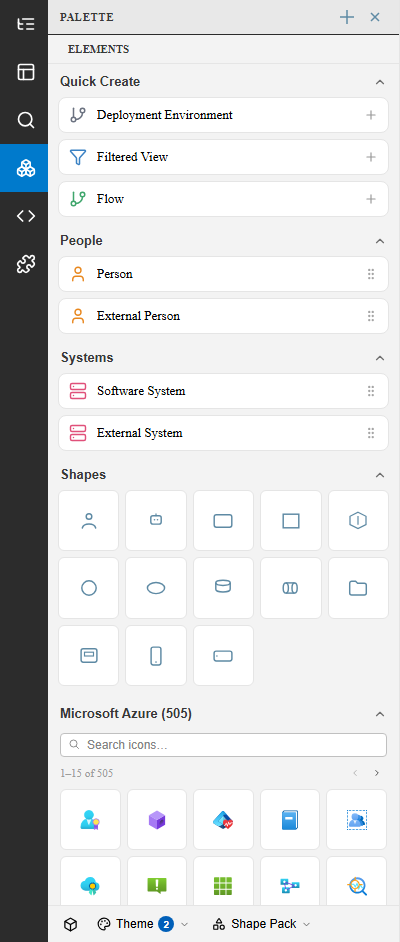
Sections
Section titled “Sections”| Section | Contents |
|---|---|
| Quick Create | One-click creation of a Deployment Environment, Filtered View, or Flow |
| People | Person and External Person shapes |
| Systems | Software System and External System shapes |
| Shapes | Generic C4 shapes — containers, components, and layout primitives |
| Icon library | A searchable icon set (e.g. Microsoft Azure) for representing specific technologies or cloud services |
Use the Theme and Shape Pack selectors at the bottom of the panel to switch which icon set the library section shows.
Adding an element
Section titled “Adding an element”Drag an item from the Palette onto the canvas to add it to the current view and the underlying model. The new element opens in the Inspector so you can immediately set its name, description, and tags.
See also
Section titled “See also”- Inspector — Editing an element after adding it
- Canvas & DSL Editor
- Themes & Appearance — Changing the visual theme applied to a view