
Views Panel
Open the Views panel from the left rail. It has four sub-tabs.
Structure
Section titled “Structure”Shows the current view (the one open on the canvas), along with its AUTO or CURRENT status. This is the default sub-tab when the panel opens.
Lists every view in the workspace — both views you define explicitly in the DSL and views ArchTect derives automatically from your model:
- Views tagged DSL are explicitly authored — they come from a
systemContext,container,component,dynamic,deployment, orfilteredblock in yourviews { }section. - Views tagged AUTO are generated automatically so every element has a reasonable default view to open, even before you’ve written one yourself.
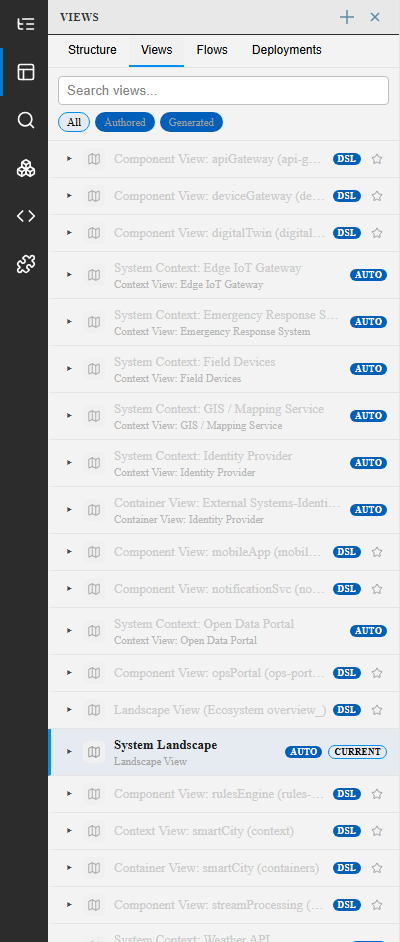
Use the search box at the top to filter by name, and the All / Authored / Generated toggle to narrow the list. Click any entry to open it on the canvas.
Lists dynamic views (interaction flows) defined in the workspace — see Dynamic Views.
Deployments
Section titled “Deployments”Lists deployment environments and their views — see Deployment Views.
Creating a view
Section titled “Creating a view”Click the + button at the top of the panel to create a new view. This opens a dialog to choose the view type and scope, and writes the corresponding block into your DSL.
See also
Section titled “See also”- Views (Modeling) — DSL syntax for each view type
- Canvas & DSL Editor